Upload Image
Try It Out
Want to test the application with runes?
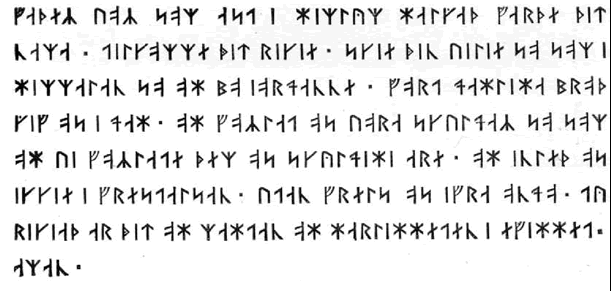
This sample image contains rune symbols that can be decoded with our tool.
Help & Instructions
How Symbol Detection Works
Application Flow
- Upload an image with symbols (ideally black symbols on white background)
- Adjust detection parameters if needed (see explanation below)
- Click "Process Image" to detect and group similar symbols
- Select symbol groups and assign replacement characters. Click on each group to view all symbols and exclude any that don't belong by using the checkboxes.
- Click "Apply Replacements" to generate the result image
- Download the final image with symbols replaced by text
Detection Parameters Explained
- Symbol Dimensions: Define the size range (in pixels) for symbols to detect. Adjust these values based on your image resolution and symbol sizes.
- Target Number of Groups: Estimate how many different unique symbol types exist in your image. This helps the clustering algorithm.
-
Clustering Sensitivity: Controls how similar symbols must be to be grouped together.
- Higher sensitivity → More groups, more precise but might split similar symbols
- Lower sensitivity → Fewer groups, more tolerant of symbol variations
Tips for Best Results
- Use high-contrast images with clear symbols
- For runes and symbols, using images with black symbols on white backgrounds works best
- If symbols aren't detected, try adjusting the min/max width and height parameters
- For symbols that are grouped incorrectly, adjust clustering sensitivity
- Use the "Regroup Excluded Symbols" feature to better organize similar symbols
- Click on symbol groups to select/deselect them for replacement
Loading...
Processing image... This may take a moment.
Original Image
Click image to zoom
Symbol Groups
Select a symbol group and assign a replacement character:
Replacement Settings
No symbol groups selected yet. Click on a symbol group above to select it.